What Is SaaS? Powerful Software as a Service Guide for 2026
Introduction
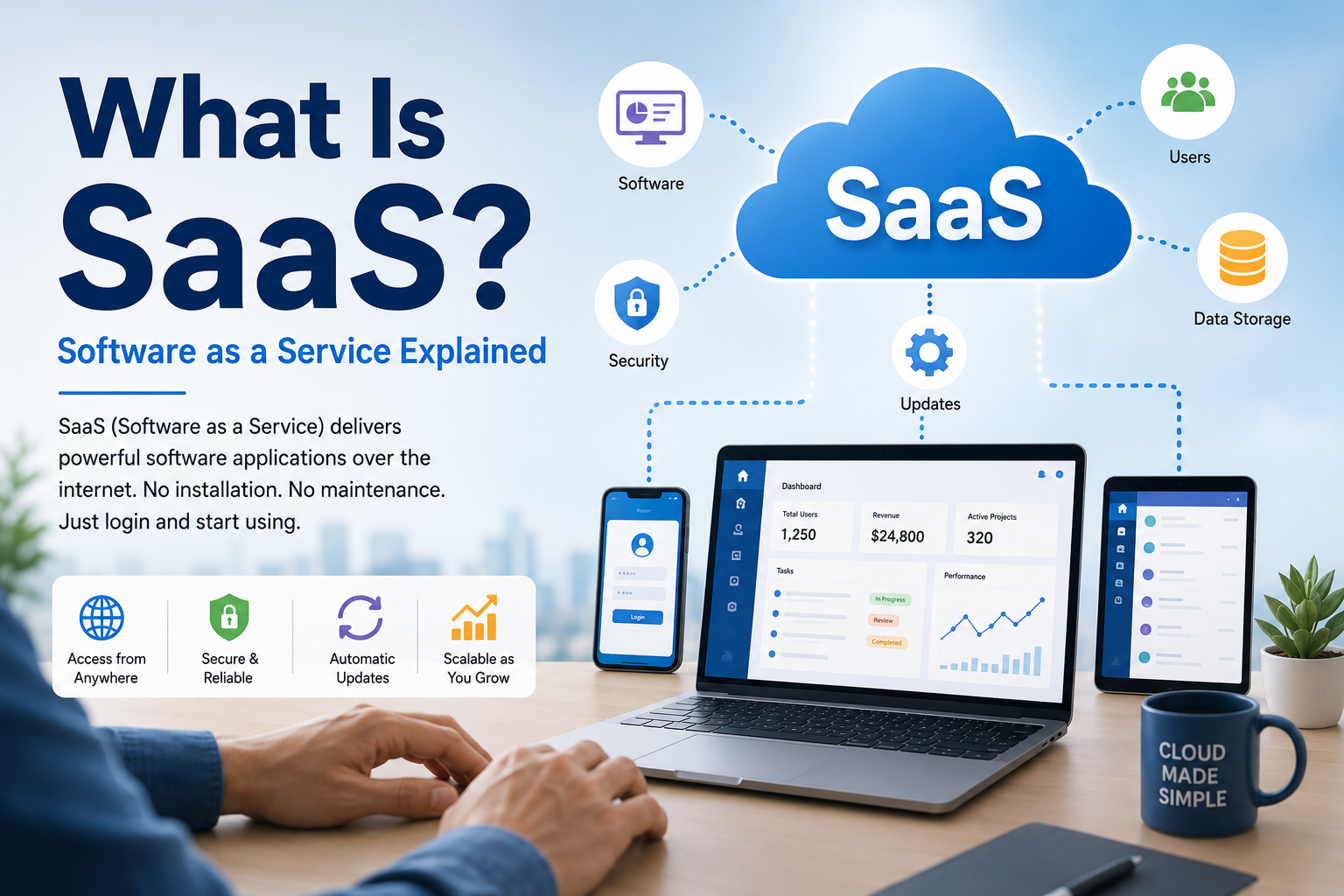
You may already use Software as a Service (SaaS) without realizing it. Instead of downloading a program, installing it on your computer, and managing updates yourself, you can often open a website, sign in, and start using the software immediately. This model has changed how individuals, startups, schools, and businesses access and manage software.
But what exactly is SaaS, how does it work, and why has it become such an important part of modern computing?
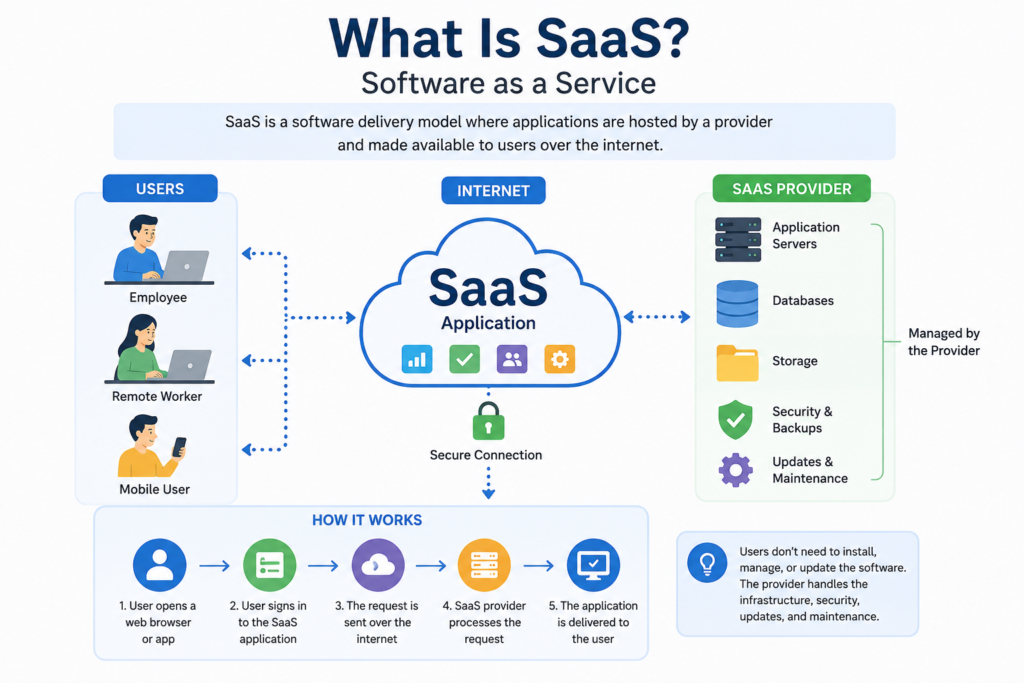
In simple terms, SaaS is a software delivery model in which a provider hosts an application and makes it available to customers over the internet. Users generally access the application through a web browser or another client, while the provider manages much of the underlying infrastructure and software environment. NIST defines SaaS as a cloud service model where customers use applications running on cloud infrastructure without managing the underlying servers, operating systems, storage, and related infrastructure.
This guide explains what SaaS means, how SaaS applications work, their advantages and disadvantages, common examples, and what to consider before relying on a SaaS service.
What Is SaaS?
SaaS stands for Software as a Service. It is a cloud computing service model that delivers software over the internet rather than requiring users to manage the software and infrastructure locally.
With traditional software, you might purchase a license, download an installer, install the application, and maintain it on your own device. With SaaS, the provider hosts the application and makes it available remotely.
For example, imagine a company needs software for managing customer information. Instead of purchasing servers and installing a CRM system internally, the company can subscribe to a cloud-based CRM platform. Employees can sign in through their browsers and use the software while the provider handles much of the technical infrastructure.
NIST identifies SaaS as one of the three primary cloud service models, alongside Infrastructure as a Service (IaaS) and Platform as a Service (PaaS).
SaaS in Simple Terms
A useful way to think about SaaS is:
Traditional software: You own or install the software on your device.
SaaS: You access software that is hosted and operated by a service provider.
The exact arrangement varies between providers, but SaaS generally reduces the amount of infrastructure and maintenance that customers need to manage themselves.
Why Is SaaS Important?
SaaS is important because it changes the way software is deployed, maintained, and accessed.
In a traditional environment, an organization may need to purchase hardware, install applications, maintain operating systems, apply updates, and troubleshoot technical problems. SaaS can move much of that responsibility to the service provider.
AWS explains that SaaS customers generally do not need to manage the underlying infrastructure and can instead focus on using the application. SaaS services commonly use subscription or usage-based pricing rather than requiring customers to purchase the complete software package upfront.
For businesses, this can simplify software deployment. A new employee may only need an account and appropriate permissions rather than a manually configured software installation.
For individuals, SaaS can make sophisticated applications accessible from different devices without requiring the user to manage the servers behind them.
How Does SaaS Work?
A SaaS application depends on cloud infrastructure operated by the provider.
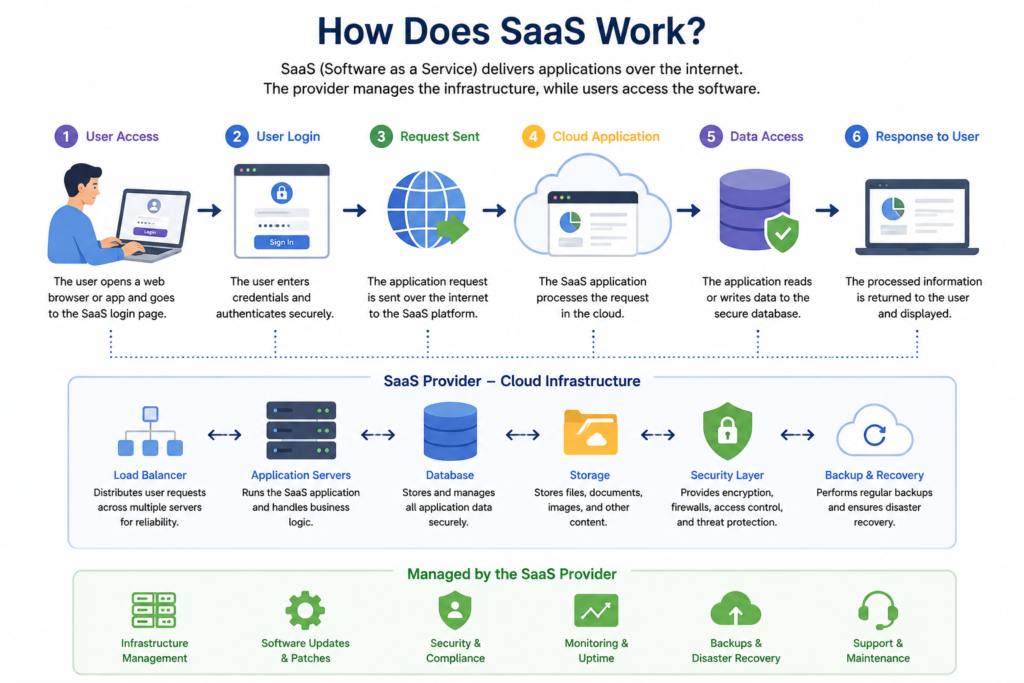
The basic process looks like this:
- The SaaS provider hosts the application and supporting infrastructure.
- The provider stores and manages the data required by the application.
- The customer creates an account or receives access from an administrator.
- The user signs in through a web browser or supported application.
- The SaaS platform processes requests using the provider’s cloud infrastructure.
- Updates and maintenance are generally handled by the provider.
This means the user interacts with the application without needing direct access to the underlying servers, operating systems, databases, or networking equipment.
AWS notes that SaaS providers may host applications and data on their own infrastructure or use third-party cloud infrastructure. Many SaaS platforms also use multi-tenant architectures, where a shared application environment serves multiple customers while keeping customer data and access logically separated.
A Simple SaaS Example
Consider an online project management application.
A traditional approach might require a company to install project management software on internal computers and maintain the necessary infrastructure.
With SaaS, the company can subscribe to an online platform. Employees sign in through their browsers, create projects, assign tasks, and collaborate online. The provider manages the application infrastructure behind the scenes.
The important difference is not simply that the application is online. It is that the application is delivered as a managed service rather than being entirely installed and maintained by the customer.
Key Features of SaaS
Although SaaS products differ considerably, many share several characteristics.
Internet-Based Access
SaaS applications are commonly accessed over the internet through browsers or software clients. This allows users to work from different devices and locations, provided the required service and connection are available. NIST specifically describes SaaS applications as accessible through various client devices, including thin-client interfaces such as web browsers.
Provider-Managed Infrastructure
The provider normally manages the infrastructure behind the application. Customers generally do not control the physical servers, networking hardware, operating systems, or storage infrastructure supporting the service.
Regular Updates
Because the provider operates the service, updates can generally be deployed centrally rather than requiring every customer to manually install a new version. AWS and Microsoft both identify provider-managed updates as a major characteristic of SaaS.
Subscription-Based Access
Many SaaS services use recurring subscriptions, although pricing models can differ. Some services offer free tiers, usage-based pricing, per-user pricing, or combinations of these approaches. SaaS therefore describes the delivery model, not one single pricing method.
Scalability
SaaS platforms are often designed to support organizations as their needs change. Depending on the provider, customers may be able to add users, increase storage, or move to another service tier without rebuilding the entire software environment.
Benefits of SaaS
SaaS can provide several practical advantages.
1. Easier Deployment
A business may be able to start using a SaaS application without purchasing and configuring dedicated servers. Users can often begin after creating accounts and setting permissions.
2. Reduced Infrastructure Management
Customers generally do not have to operate the physical infrastructure supporting the SaaS application. This can reduce the amount of technical administration required on the customer side.
3. Access From Multiple Devices
Because SaaS applications commonly work through browsers or internet-connected clients, users can often access the same service from computers, tablets, or smartphones.
4. Centralized Updates
The service provider can deploy updates centrally, which helps reduce the need for users to maintain separate installations.
5. Easier Collaboration
Many SaaS applications are built around shared online data. Teams can collaborate on documents, projects, communication, customer records, or other workflows without relying entirely on locally stored files.
6. Flexible Scaling
Organizations can often change their subscriptions as their requirements evolve. This can be useful for companies that grow gradually or experience changes in staffing and workload.
Disadvantages and Challenges of SaaS
SaaS is not automatically the best option for every situation. It also introduces important trade-offs.
Internet Dependence
Many SaaS applications require reliable internet connectivity. If the service is unavailable or the user’s connection is poor, access may be limited.
Less Control Over Infrastructure
Customers generally do not control the provider’s servers, operating systems, or core infrastructure. This is one of the fundamental differences between SaaS and software managed entirely by the customer.
Vendor Dependency
When an organization becomes heavily dependent on a SaaS provider, changing to another platform can become difficult. Migration may involve moving data, rebuilding workflows, retraining users, and integrating new systems.
Data and Privacy Considerations
Organizations need to understand where data is stored, how it is protected, what administrative controls exist, and what happens to information if the organization ends its subscription.
Ongoing Costs
Although SaaS may avoid some upfront infrastructure expenses, recurring subscription costs can become significant over time. The right evaluation should consider the total cost of ownership rather than looking only at the initial price.
Service Availability
A customer may depend on the provider’s uptime and technical operations. An outage can affect users even when their own computers and local networks are functioning normally.
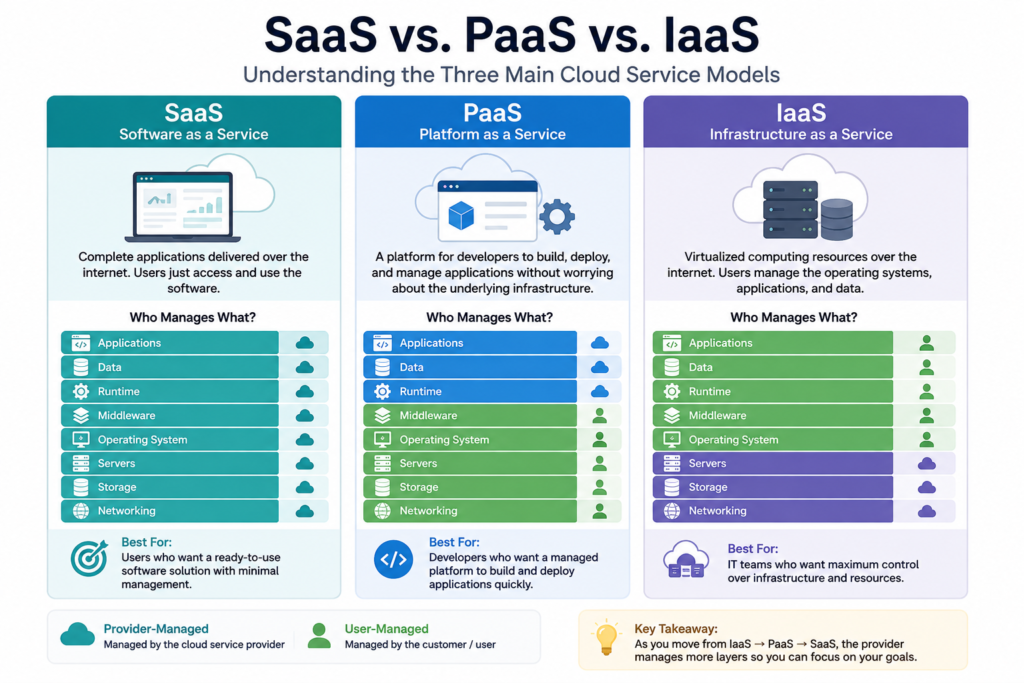
SaaS vs. IaaS vs. PaaS
SaaS is easiest to understand when compared with the other major cloud service models.
| Model | What You Get | Main User Responsibility |
|---|---|---|
| IaaS | Virtual servers, storage, networking, and other infrastructure | Manage operating systems, applications, configurations, and data |
| PaaS | A managed environment for building and deploying applications | Focus primarily on application code and data |
| SaaS | A ready-to-use software application | Mainly configure and use the application |
NIST identifies SaaS, PaaS, and IaaS as the three primary cloud service models. Microsoft similarly describes IaaS as infrastructure, PaaS as a development environment, and SaaS as complete applications delivered over the internet.
A simple way to remember the difference is:
IaaS = manage infrastructure
PaaS = build applications
SaaS = use applications
Common SaaS Use Cases
SaaS is used in many areas of everyday work and business.
Productivity
Organizations can use cloud-based applications for writing documents, managing files, organizing information, and collaborating with teams.
Customer Relationship Management
CRM software delivered as SaaS can help businesses manage customer information, sales activities, communication, and support workflows.
Project Management
Teams can use SaaS platforms to create tasks, assign responsibilities, track progress, and coordinate projects.
Communication
Email, video conferencing, messaging, and team collaboration platforms are common examples of software that can be delivered through cloud-based service models.
Accounting and Business Operations
Companies can use SaaS applications for accounting, invoicing, reporting, payroll-related workflows, inventory management, and other administrative tasks.
Microsoft highlights productivity, CRM, business intelligence, email, collaboration, and video conferencing as examples of SaaS use cases.
SaaS vs. Traditional Software
The biggest difference is who manages the software environment.
With traditional software, the customer may be responsible for installing and updating the software, maintaining compatible hardware, and managing parts of the environment.
With SaaS, the provider manages most of the infrastructure and makes the application available as a service.
This does not mean SaaS is completely maintenance-free for customers. Users may still need to configure settings, manage accounts, control permissions, train employees, review integrations, and protect their own login credentials and data.
How to Choose a SaaS Service
Before adopting a SaaS application, consider more than its features.
Understand Your Requirement
Start by identifying the actual problem the software needs to solve. A long list of features does not necessarily mean the service is appropriate.
Check Data Management
Understand what information the service stores, how you can export it, and what happens to your data when your subscription ends.
Review Security Controls
Look for information about authentication, access controls, encryption, backups, administrative permissions, and other security measures relevant to your organization.
Examine Integration Options
A SaaS application is often more useful when it works with the other tools your organization already uses. APIs and integrations can help connect different services. AWS identifies APIs as a common way to integrate SaaS applications with other systems.
Calculate Long-Term Costs
Consider subscription costs, additional users, storage, premium features, implementation, migration, and training.
Evaluate Vendor Reliability
Look at the provider’s documentation, service commitments, support options, and processes for handling outages or account problems.
Common SaaS Mistakes to Avoid
One common mistake is choosing software based only on its feature list.
A better approach is to start with the workflow you need to improve and then evaluate whether the software genuinely fits that workflow.
Another mistake is ignoring data portability. Before committing to a service, organizations should understand how information can be exported and migrated.
It is also easy to overlook user permissions. Giving every employee the same level of access can create unnecessary security risks.
Finally, do not assume that a SaaS provider automatically takes care of every aspect of security. The provider may manage the underlying platform, but customers still have responsibilities such as protecting accounts, configuring access correctly, and using appropriate security practices.
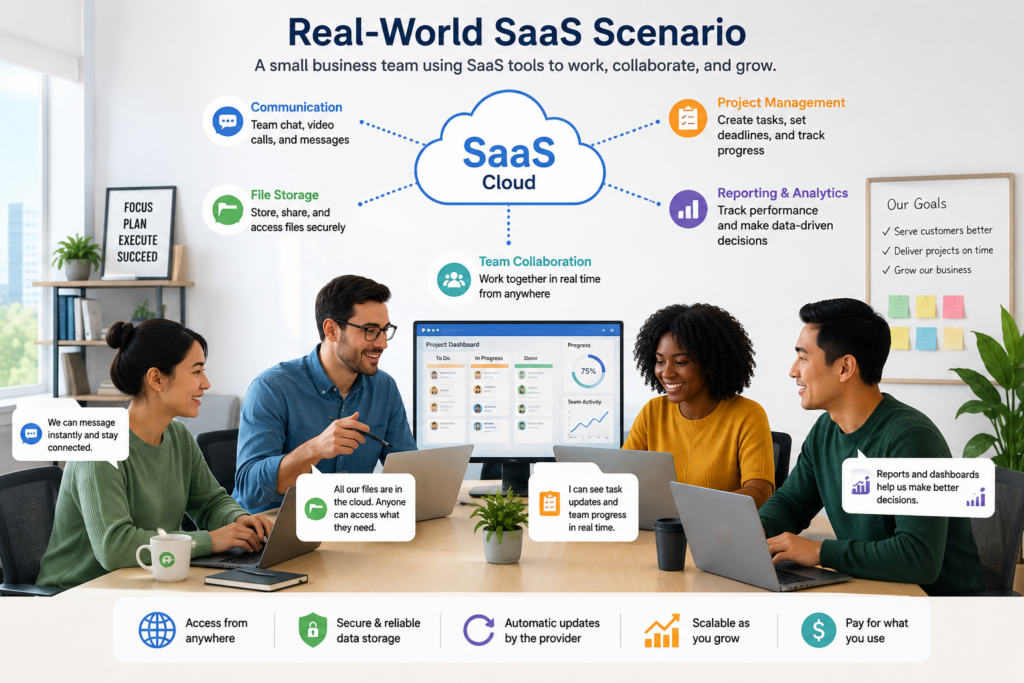
Real-World SaaS Scenario
Imagine a small marketing company with ten employees.
The company needs tools for project management, customer communication, document collaboration, and reporting. Instead of building and maintaining its own internal software infrastructure for each task, it can use cloud-based SaaS applications.
Employees log in using their assigned accounts. Managers control permissions, team members collaborate online, and the software provider handles much of the underlying infrastructure and application maintenance.
The company still needs to evaluate security, costs, access controls, integrations, and data management. But it does not need to operate the full technology infrastructure required to host every application itself.
This illustrates the central idea behind SaaS: the customer focuses on using the software while the provider operates the service behind it.
Final Thoughts
SaaS has become a major way of delivering software because it moves much of the technical infrastructure and maintenance from the customer to the service provider.
Instead of installing and managing every application locally, users can access many software tools through the internet while the provider handles the underlying systems. This can simplify deployment, support collaboration, and make software easier to scale. At the same time, SaaS introduces responsibilities around security, privacy, data portability, vendor dependency, and long-term cost.
The most important thing to remember is that SaaS describes how software is delivered and managed. It is not simply a label for any application that happens to work online.
Understanding that distinction makes it easier to evaluate SaaS products, compare cloud service models, and decide whether a particular solution fits your needs.
Recommended Authoritative Sources
- National Institute of Standards and Technology (NIST), The NIST Definition of Cloud Computing (SP 800-145).
- NIST Computer Security Resource Center, Software as a Service (SaaS) Glossary.
- Amazon Web Services (AWS), What is SaaS?
- Microsoft Azure, What is Software as a Service (SaaS)?
- What Is SaaS? What Is SaaS? What Is SaaS? What Is SaaSWhat Is SaaS What Is SaaS What Is SaaS What Is SaaS What Is SaaSWhat Is SaaSWhat Is SaaSWhat Is SaaS What Is SaaS What Is SaaS What Is SaaS What Is SaaSWhat Is SaaS?