Gamma AI Review 2026: Powerful, Honest & Unbiased — Is It Legit or a Scam?
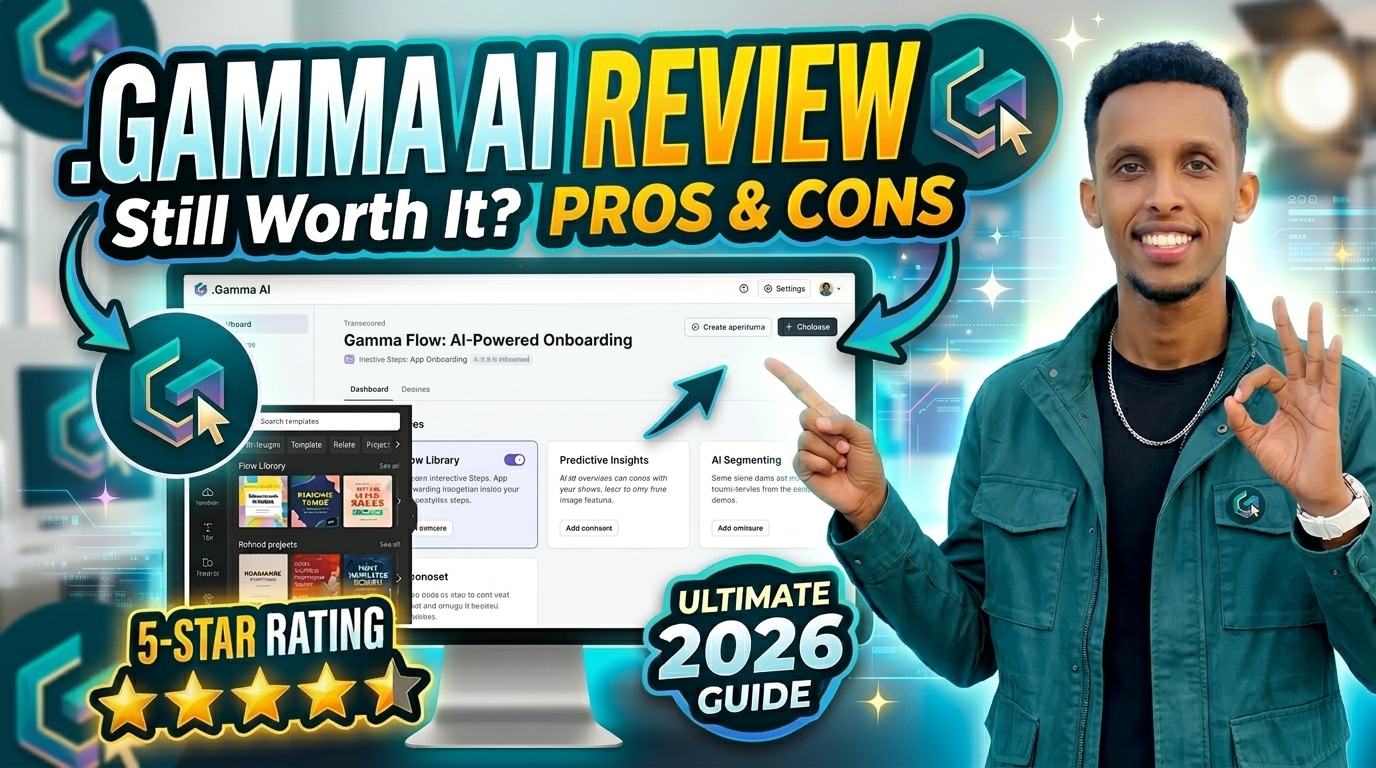
Quick Summary
If you’ve ever spent hours trying to turn a rough idea into a decent presentation, Gamma AI is the kind of tool that immediately gets your attention.
Gamma AI (gamma.app) is a browser-based AI platform that can take a simple prompt, outline, or uploaded document and turn it into a presentation, document, or simple website in minutes. Instead of starting with a blank PowerPoint slide, you give Gamma an idea and let it build the first version for you.
The company behind Gamma is Gamma Tech, Inc., which was founded in 2020. By late 2025, Gamma reported having more than 70 million users and a valuation of over $2 billion.
But there’s an important catch.
Gamma is extremely good at getting you from “I need a presentation” to “Here’s something I can actually show people.” Where things become less impressive is when you need a perfectly editable PowerPoint file, or when you have to deal with the company’s refund and credit policies.
Our overall verdict
Gamma is legitimate, useful, and surprisingly fast. It’s not a scam.
For sales decks, internal presentations, marketing ideas, classroom projects, and web-based presentations, Gamma can save a huge amount of time.
However, I’d be more careful before paying for an annual subscription. The refund window is short, the credit system takes some time to understand, and PowerPoint exports can still require cleanup.
| Category | Score |
|---|---|
| Features | 8.5/10 |
| Ease of Use | 9.0/10 |
| Pricing Transparency | 6.0/10 |
| Customer Support | 5.5/10 |
| Security & Compliance | 7.0/10 |
| Performance | 8.0/10 |
| Value for Money | 7.0/10 |
| Overall | 7.6/10 |
What Is Gamma AI?
Gamma AI is a browser-based content creation platform that helps users create presentations, documents, and webpages from simple prompts. You can explore the platform directly on the official Gamma website.
You can use it to create presentations, documents, webpages, and other visual content without having to design everything manually.
One thing that makes Gamma different from traditional presentation software is its card-based format.
Instead of forcing everything into a fixed 16:9 slide, Gamma uses flexible cards that expand or shrink depending on the content. You can place text, images, charts, videos, and other elements inside them.
That approach makes Gamma particularly good for content that will be viewed online.
The downside? When you eventually export that flexible design into a traditional PowerPoint file, things don’t always translate perfectly.
And that’s one of the biggest themes you’ll notice throughout this review: Gamma is excellent when you work inside Gamma, but exporting to PowerPoint isn’t always as clean as you might expect.
Gamma’s Background
Gamma was founded in 2020 by Grant Lee, James Fox, and Jon Noronha.
The product started gaining attention during its 2022 beta period, at a time when AI-generated presentations were still relatively new.
By late 2025, Gamma reported more than 70 million users and over $100 million in annual recurring revenue. The company also raised a $68 million Series B led by a16z at a reported $2.1 billion valuation.
Gamma has also stated that it has been profitable for more than two years while operating with a relatively small team.
The company lists organizations including Amazon, Adobe, Vercel, Zoom, the Los Angeles Times, and Stanford University among teams using Gamma. It’s worth remembering, though, that these are company-provided customer claims rather than an independently audited customer list.
What Is Gamma Trying to Do?
Gamma’s basic idea is to remove one of the most annoying parts of creating presentations: starting from nothing.
Instead of opening PowerPoint and staring at a blank slide, you describe the presentation you need.
Gamma then helps structure the content, write the initial copy, choose layouts, and add visuals.
With the release of Gamma 3.0 in September 2025, the platform expanded beyond presentations. Gamma began positioning itself as a broader visual storytelling tool for presentations, documents, websites, and social media graphics.
In other words, Gamma isn’t really trying to be “another PowerPoint.”
It’s trying to become the place where you create the content before deciding how you want to share it.
How Does Gamma AI Work?
Getting started with Gamma is fairly straightforward.
Here’s what the process looks like in practice:
1. Start with an idea
You can type a simple prompt, paste an outline, or upload an existing PDF, Word document, or PowerPoint file.
For example:
“Create a 10-card sales presentation for a SaaS company showing its Q3 marketing results.”
You don’t need to write everything perfectly. Gamma’s job is to turn the rough idea into a structured draft.
2. Choose what you’re creating
Gamma lets you choose between formats such as:
- Presentation
- Document
- Webpage
- Social post
3. Pick a visual style
Gamma suggests themes, layouts, and color combinations based on your content.
You can choose a style that fits the type of presentation you’re making and adjust it afterward.
4. Let Gamma generate the first draft
This is probably the most impressive part of the product.
Within roughly 30–60 seconds, Gamma can create a structured draft containing headings, written content, images, and other visual elements.
The first version isn’t necessarily perfect.
But that’s not really the point.
The value is that you suddenly have something to work with.
5. Edit using Gamma Agent
Gamma’s Agent lets you make changes using normal language.
Instead of manually changing every element, you can ask it things like:
- “Make this section shorter.”
- “Add a competitor comparison.”
- “Make this slide more visual.”
- “Translate this presentation.”
- “Use our brand colors.”
This can make the editing process considerably faster.
6. Make manual changes
If the AI doesn’t get everything right, you can still edit the content yourself.
You can move elements around, change images, add charts, embed videos, and make other adjustments.
7. Share or export
Once you’re happy with the result, you can publish it as a web link or export it to formats such as:
- PNG
- PPTX
- Google Slides
This is where one of Gamma’s biggest limitations appears.
Gamma AI Features: What Do You Actually Get?
1. AI Presentation Generation
Gamma can create a presentation from surprisingly little information.
Give it a topic, an outline, or an existing document and it can build a complete first draft.
That’s especially useful when you’re dealing with the dreaded blank-page problem.
Example: Imagine you’ve just finished a long client meeting and have messy notes scattered across a document. Instead of manually organizing everything into slides, you can upload the notes and let Gamma create the initial structure.
Of course, you still need to review the output.
AI can misunderstand context, especially when the source material is complicated or contains information that requires judgment.
2. Gamma Agent
Gamma Agent is one of the features that makes the platform feel more modern than traditional presentation software.
You can simply tell Gamma what you want changed.
For example:
“Turn this text-heavy card into a visual comparison.”
Or:
“Add three key statistics to this section.”
The Agent can work with the broader context of the document instead of treating every edit like an isolated task.
The downside is that Agent actions use credits on paid plans, so frequent users need to pay attention to their usage.
3. Gamma Imagine
Gamma also includes AI-powered image generation.
On higher-tier plans, users can generate custom images, icons, and animations directly within their projects.
That’s useful because you don’t always have to leave Gamma to search for graphics.
The catch is that some of the better image and animation capabilities are reserved for more expensive plans.
4. Charts and Data Visualization
Gamma can turn information or data into charts and visual callouts.
This is particularly useful when you’re creating reports or presentations where the audience needs to understand numbers quickly.
Instead of building the chart somewhere else and importing it, Gamma can handle much of that process for you.
5. Connectors
Gamma’s Connectors allow it to pull information from external tools and documents.
For people who regularly turn existing material into presentations or summaries, this can remove another manual step from the workflow.
6. Gamma’s Card-Based Design
This is arguably Gamma’s most distinctive feature.
Rather than thinking in terms of traditional slides, Gamma thinks in terms of flexible cards.
That makes the content feel more like a modern webpage than a PowerPoint presentation.
For online sharing, that’s a big advantage.
For PowerPoint export, it’s not always an advantage.
7. Import and Export
Gamma supports importing PDF and PPTX files and exporting content to PDF, PPTX, PNG, and Google Slides.
That’s convenient, but there’s an important warning here.
Independent reviews have reported problems with PowerPoint exports, including shifted text, overlapping elements, and layouts being converted into images instead of remaining fully editable.
Gamma has made improvements to font handling during 2026, but PPTX export remains one of the main areas where I’d recommend checking the final file carefully.
If you’re sending the presentation as a Gamma link, this isn’t nearly as much of an issue.
8. API Access
Gamma’s API is available starting with the Pro plan.
This can be useful for agencies, developers, and teams that want to generate presentations automatically through tools such as Zapier, Make, or n8n.
For someone creating one presentation a month, this probably doesn’t matter.
For an agency generating dozens or hundreds of decks, it could be much more valuable.
9. Custom Branding and Domains
Pro and higher plans provide additional branding options, including:
- Custom fonts
- Brand colors
- Custom domains
- More control over published content
Pro supports up to 10 custom domains, while Ultra and Business support more.
10. Team Collaboration
Team and Business plans include features such as shared folders, centralized billing, company themes, and administrative controls.
These features are aimed more at organizations than individual users.
Gamma AI Pricing 2026
Gamma’s pricing looks straightforward at first.
Once you understand the credit system, however, there are a few details worth paying attention to.
How Gamma’s Credit System Works
The Free plan uses credits for AI actions.
For example, generating a deck can consume around 40 credits, while an AI image can cost around 10 credits.
Paid plans work differently.
Standard presentations and standard images are included in the subscription, while credits are mainly used for things such as Agent edits, premium Ultra models, and API calls.
This distinction is important because someone looking only at the number of monthly credits could misunderstand how much normal usage their plan actually includes.
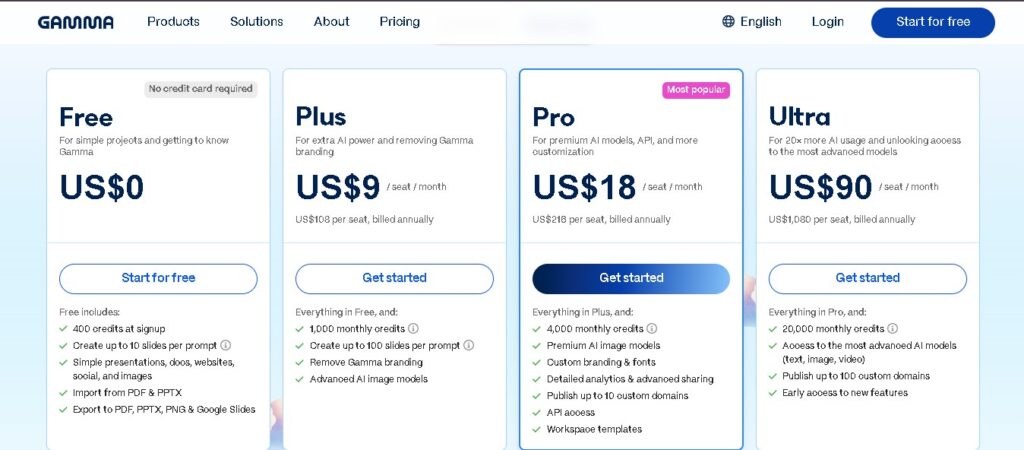
Gamma Pricing
| Plan | Price | Monthly Credits | Cards/Prompt | Best For |
| Free | $0 | 400 one-time | 10 | Testing Gamma or one-off projects |
| Plus | $9/seat/month | 1,000 | 20 | Casual users |
| Pro | $18/seat/month | 4,000 | 60 | Regular individual users |
| Ultra | $90/month | 20,000 | 75 | Heavy AI users |
| Team | $20/seat/month | 6,000/seat | Pro limits | Small teams |
| Business | $40/seat/month | 10,000/seat | Team limits | Larger organizations |
Annual billing can reduce the effective cost on several plans, although Ultra is currently monthly-only according to the information reviewed for this article.
What You Should Know Before Paying
This is the section I’d pay the most attention to if you’re considering Gamma.
1. Free credits don’t refresh
The 400 Free credits are a one-time allocation.
Once you’ve used them, you don’t simply receive another 400 credits next month.
2. Credits don’t roll over forever
Unused credits have a rollover limit.
So you shouldn’t assume that unused credits will keep accumulating indefinitely.
3. Annual credits are provided monthly
If you choose an annual plan, you don’t receive the entire year’s credit allowance upfront.
Credits are distributed monthly.
4. The refund window is very short
Gamma’s refund policy gives users only a 3-day refund window, subject to usage limits.
This is one of the biggest reasons I’d recommend testing the service before committing to an annual subscription.
5. Cancelling can affect unused credits
After your paid billing period ends, credits above the applicable Free allowance can be removed.
6. Team members cost extra
Adding another team member means adding another paid seat.
7. There is no pause option
If you stop using Gamma, you generally have to cancel and subscribe again later rather than simply pausing the account.
8. Paid users can purchase additional credits
Paid subscribers who run out can purchase additional credits, while Free users don’t have the same top-up option.
My advice
Don’t jump straight into an annual subscription.
Try the Free plan first.
If you need more features, use Pro for one month and see how much you actually use Gamma.
That gives you a much better idea of whether the subscription makes sense for your workflow.
Gamma AI Pros and Cons
What I Like About Gamma
Fast first drafts
This is Gamma’s biggest strength.
Getting a usable presentation from an idea in under a minute can save a surprising amount of time.
Good-looking results without design skills
Gamma generally produces more interesting layouts than the repetitive bullet-point slides you often get from traditional templates.
AI-powered editing
Being able to tell the Agent what you want changed is much quicker than manually formatting every section.
Multiple content formats
You aren’t limited to presentations. Gamma can also create documents and simple websites.
Useful Free plan
The Free plan gives you enough functionality to test whether Gamma fits your needs.
Excellent for web sharing
If your audience is going to open a link rather than download a PowerPoint file, Gamma becomes much more attractive.
API support
Developers and agencies can automate content generation through the API.
Gamma AI Cons
PowerPoint exports aren’t always perfect
This is probably the biggest technical weakness.
Some exports may contain shifted text, overlapping elements, or sections that aren’t as editable as you’d expect.
Refund policy can be frustrating
The short refund period is a legitimate concern, particularly for annual subscriptions.
Credit usage can be confusing
Depending on which AI features you use, credits can disappear faster than expected.
The Free plan is more like a limited trial
Because the Free credits don’t refresh, it’s not the same as a traditional free-forever plan with a monthly allowance.
Less design control than Canva
Gamma prioritizes speed and simplicity. If you want extremely precise control over every element, Canva may be a better fit.
Ultra is expensive
At $90 per month, Ultra is aimed at heavy users rather than casual creators.
Team plans have minimum seats
This can make Gamma less attractive for very small teams.
Gamma AI User Experience
One thing I noticed about Gamma is that you don’t need to spend hours learning how to use it.
The interface is clean, modern, and relatively easy to understand.
Dashboard
The dashboard is straightforward, and most new users should be able to create something useful without following a lengthy tutorial.
Speed
Speed is one of Gamma’s strongest points.
A normal presentation can be generated in roughly a minute, depending on the content and workload.
Mobile
Gamma is primarily designed for desktop and browser use.
You can view and make lighter edits from a mobile browser, but if you’re doing serious editing, I’d recommend using a larger screen.
Ease of use
The basic prompt-to-presentation workflow is simple enough for people who don’t have design experience.
However, there’s a difference between easy to use and easy to get perfect results from.
Your prompt still matters.
The more specific your instructions are, the better the final presentation tends to be.
Performance, Security and Customer Support
Performance
Gamma performs well for its main purpose.
Speed
Generation is generally fast.
Reliability
The core platform is generally stable, while the more noticeable problems tend to appear around PowerPoint exports or credit usage rather than basic access.
Accuracy
This is still AI-generated content.
You should always review facts, numbers, names, and claims before sending a presentation to a client or publishing it publicly.
Scalability
The API makes Gamma more useful for agencies and organizations that need to produce content at scale.
Customer Support
Gamma provides a help center and support through online channels.
The documentation can answer many common questions, but user reviews have highlighted slower responses around billing and refund disputes.
That’s worth knowing because billing problems are exactly the type of issue where users usually want a fast response.
Is Gamma AI Safe?
Company Transparency
Gamma publishes its pricing, privacy policy, terms of service, and refund information publicly.
That’s a positive sign.
Data Privacy
Gamma states that it complies with GDPR and CCPA.
One important detail is that data-training settings differ between individual and business plans.
According to the information reviewed for this article, content on individual plans may be used to train Gamma’s AI models by default unless users opt out.
For Team and Business workspaces, training use is automatically disabled.
If you’re uploading confidential client information, company documents, or proprietary material, check your data settings before uploading anything sensitive.
Gamma AI and Security Certifications
There’s an important naming issue here.
Gamma Tech, Inc., the company behind gamma.app, should not be confused with other companies that also use the name “Gamma.”
Some third-party websites have incorrectly mixed information from these unrelated companies.
Gamma’s Business offering provides SOC 2 documentation on request, according to the information reviewed for this article.
However, SOC 2 documentation by itself does not automatically mean that a service is HIPAA compliant.
If your organization handles protected health information or other highly regulated data, confirm the exact compliance scope and BAA availability directly with Gamma before using it.
Bottom line on security
For normal business presentations and everyday content, Gamma’s security and privacy approach appears reasonably standard for a modern SaaS platform.
For healthcare, finance, legal work, or other highly sensitive environments, don’t rely solely on marketing claims.
Verify the compliance details yourself.
Is Gamma AI Legit?
Yes. Gamma AI is legitimate.
Based on the evidence reviewed for this article, Gamma is a real software company with a real product, a large reported user base, significant venture funding, and an established presence in the AI productivity market.
There is no evidence here that Gamma is a scam operation.
The concerns surrounding Gamma are mainly about pricing, credits, refunds, customer support, and PowerPoint exports rather than the company failing to provide the service it advertises.
Signs that Gamma is legitimate
- Documented funding history
- Large reported user base
- Public pricing
- Public terms and privacy policies
- Established product
- Positive reviews on several software platforms
- Active development and new features
Is Gamma AI a Scam?
No, Gamma is not a scam.
However, there’s an important distinction between saying a company is legitimate and saying every part of its business model is user-friendly.
Gamma’s biggest negative feedback tends to focus on its refund policy and credit system.
Some users have reported frustration with:
- The short refund window
- Unexpected credit usage
- Billing issues
- Slow support responses
That doesn’t automatically make Gamma fraudulent.
In fact, the contrast between strong product-review scores and weaker Trustpilot sentiment suggests that many complaints are about the subscription and billing experience, rather than the product simply not working.
If you’re thinking about paying for Gamma
I’d recommend three things:
- Start monthly.
- Read the refund policy before subscribing.
- Check your AI-training settings before uploading sensitive information.
What Do Real Users Say About Gamma?
Public reviews from Trustpilot, G2, Capterra, and Product Hunt show a fairly consistent pattern.
People generally like the product itself.
They are much less enthusiastic about certain aspects of the billing experience.
What users like
People commonly praise Gamma for:
- Turning rough ideas into presentations quickly
- Producing attractive layouts
- Saving time
- Being easier than traditional presentation software
- Helping marketers, educators, consultants, and product teams create drafts quickly
What users don’t like
The most common complaints include:
- Difficult refund experiences
- Credits disappearing faster than expected
- Slow responses to billing issues
- Occasional inaccuracies in generated content
- Output quality that sometimes needs more manual editing than expected
- PowerPoint export problems
So the overall picture is pretty clear:
Users generally like Gamma as a product, but billing and refund experiences are where the strongest criticism appears.
Gamma AI Alternatives
Gamma isn’t the only AI-powered presentation tool available.
The best alternative depends on what you’re trying to create.
| Tool | Best For | Where Gamma Has an Advantage |
| Canva | Broad design flexibility | Faster prompt-to-deck creation |
| Beautiful.ai | Brand control | More conversational AI workflow |
| PowerPoint + Copilot | Traditional editable PPTX files | Faster AI-native generation |
| Google Slides | Collaboration | More built-in AI presentation generation |
| Pitch | Investor and financial decks | Easier fast-start generation |
Gamma vs Canva
Canva gives you much more control over individual design elements and offers a huge ecosystem of templates.
Gamma, however, is generally faster if your goal is simply:
“Here’s my topic. Build me a presentation.”
Gamma vs Beautiful.ai
Beautiful.ai is particularly strong when brand consistency and design control are priorities.
Gamma has the advantage if you prefer telling an AI what you want and letting it handle more of the structure.
Gamma vs PowerPoint
PowerPoint remains the safer choice if the final deliverable needs to be a fully editable .pptx.
Gamma is more attractive if the presentation will primarily be shared online.
Gamma vs Google Slides
Google Slides is excellent for real-time collaboration, particularly if your team already lives inside Google Workspace.
Gamma provides a more AI-first creation experience.
Gamma vs Pitch
Pitch can be a strong option for professional investor and business presentations.
Gamma is often easier when you simply want to generate a first draft quickly.
Which Tool Should You Choose?
It really depends on what you’re delivering.
Choose Gamma if:
- You want a presentation quickly.
- You’re comfortable sharing it as a web link.
- You don’t want to spend hours designing slides.
- You want AI to handle much of the first draft.
- You create presentations regularly.
- You want API automation.
Consider another tool if:
- Your final file must be a pixel-perfect PowerPoint.
- You need highly precise design control.
- You’re building complex financial presentations.
- You need strict corporate brand templates.
- You’re handling regulated data without confirmed compliance.
Who Is Gamma AI Best For?
Gamma makes the most sense for people who value speed over pixel-perfect control.
It’s particularly useful for:
- Marketers
- Startup founders
- Consultants
- Product managers
- Educators
- Students
- Sales teams
- Agencies
- Developers automating presentations
For example, a consultant can turn meeting notes into a client-ready first draft.
A teacher can create a classroom presentation without spending an entire evening formatting slides.
A startup founder can build a pitch deck quickly enough to test an idea before spending hours polishing the design.
That’s where Gamma really shines.
Who Should Be Careful With Gamma?
Gamma may not be the best fit if:
- Your client requires a perfectly editable PPTX.
- You create detailed financial or technical decks.
- Your company has strict compliance requirements.
- You don’t want to deal with credit systems.
- You’re uncomfortable with a short refund window.
- You need extremely detailed design control.
Our Gamma AI Rating
| Category | Score | Our Take |
| Features | 8.5/10 | A broad and useful AI toolkit |
| Pricing | 6.0/10 | Fair, but the credit system needs attention |
| Support | 5.5/10 | Billing support is the biggest concern |
| Ease of Use | 9.0/10 | Very beginner-friendly |
| Security | 7.0/10 | Reasonable basics; verify regulated-use requirements |
| Performance | 8.0/10 | Fast and generally reliable |
| Value for Money | 7.0/10 | Strong if you actually use its features |
| Overall | 7.6/10 | Recommended, with important caveats |
Final Verdict: Is Gamma AI Worth It?
After looking at the features, pricing, user feedback, limitations, and overall experience, my answer is:
Yes, Gamma AI is worth trying — but I wouldn’t rush into an annual subscription.
The product solves a genuine problem.
Instead of spending hours building a presentation from scratch, you can start with an idea and have Gamma turn it into something structured and visually appealing in a matter of minutes.
That’s a real productivity win.
The platform is particularly impressive when you keep your presentation inside Gamma and share it through a web link.
Where things become less impressive is when you need a perfectly editable PowerPoint file. Exporting can still require manual cleanup, particularly with more complicated layouts.
The other issue is the subscription model.
The credit system isn’t necessarily bad, but it isn’t completely straightforward either. Add the strict refund window, and there’s a good reason to test Gamma before committing to a full year.
Our recommendation
Start with the Free plan.
If you like the workflow and need more features, try Pro for one month.
Use it for a real project rather than a quick test. See how much you actually use the Agent, how your exports look, and whether the credit system works for your workflow.
If everything checks out, then consider a longer subscription.
Gamma isn’t a scam. It’s a legitimate and capable AI presentation tool — just one where you should understand the pricing and export limitations before paying.
Frequently Asked Questions
1. Is Gamma AI free?
Yes.
Gamma has a Free plan with limited usage. The Free plan includes a one-time allocation of credits rather than a recurring monthly credit allowance.
It’s useful for testing the platform or completing a smaller project.
2. Is Gamma AI legit or a scam?
Gamma is legitimate.
It’s a real software company with a functioning product, a large reported user base, and documented venture funding.
The biggest complaints are about refunds, credits, and customer support — not about the service being fake.
3. How much does Gamma AI cost?
Gamma offers several plans.
The Free plan costs $0, Plus starts around $9 per seat per month, Pro around $18, Ultra around $90, while Team and Business plans start at approximately $20 and $40 per seat per month respectively under the pricing described in this review.
Because SaaS pricing changes, check Gamma’s current pricing before subscribing.
4. Can I get a Gamma AI refund?
Gamma’s refund policy provides a short refund window, with eligibility depending partly on how much of your plan’s allowance you’ve used.
Because of that, I strongly recommend reading the current refund policy before purchasing an annual subscription.
5. Does Gamma AI have a free trial?
Gamma doesn’t need a traditional trial because its Free plan can be used to test the product.
The Free plan gives you a limited amount of usage so you can see whether Gamma fits your workflow.
6. What’s the difference between Gamma Plus and Pro?
Plus is aimed at more casual users and removes some Free-plan limitations.
Pro adds features such as custom branding, analytics, API access, additional domains, and a larger credit allowance.
7. Does Gamma export to PowerPoint?
Yes.
However, the export isn’t always perfect.
Depending on the design, you may see text movement, overlapping elements, or sections that become less editable.
If PowerPoint is your final deliverable, always inspect the exported file before sending it to a client.
8. Is Gamma AI safe?
Gamma states that it follows GDPR and CCPA requirements and uses HTTPS/TLS encryption.
However, data-training settings differ between individual and business plans.
If you’re working with confidential information, review your account settings and Gamma’s current privacy documentation before uploading sensitive files.
9. Is Gamma AI SOC 2 certified?
Gamma Tech, Inc. provides SOC 2 documentation on request for Business customers according to the information reviewed for this article.
However, make sure you’re looking at the documentation for the actual Gamma presentation platform, because several unrelated companies also use the Gamma name.
10. Can Gamma replace PowerPoint?
For web-based presentations, Gamma can come surprisingly close.
For traditional, heavily editable .pptx presentations, especially complex financial or technical decks, PowerPoint remains the safer choice.
11. How do Gamma AI credits work?
On the Free plan, AI actions use credits.
On paid plans, standard generation is generally included, while credits are used for certain advanced features such as Agent edits, premium AI models, and API calls.
12. What happens to my credits if I cancel?
You normally keep your paid access until the end of the billing period.
After that, your account returns to the Free tier and credits above the applicable Free allowance can be removed.
13. Is Gamma good for students?
Yes.
Students and educators can benefit from Gamma because it can turn a topic or outline into a presentation quickly.
The Free plan can also be useful for occasional classroom projects.
14. Does Gamma have an API?
Yes.
API access starts with the Pro plan and can be used to automate presentation generation through integrations and development workflows.
15. What are the best Gamma alternatives?
The best alternative depends on your needs.
Canva is excellent for design flexibility.
Beautiful.ai is strong for branding and controlled layouts.
Pitch is useful for professional and investor presentations.
PowerPoint with Copilot remains a strong option when editable PPTX output is essential.
16. Does Gamma work on mobile?
Yes, but Gamma is primarily a browser-based, desktop-first product.
You can view and make light edits from a phone, but serious presentation editing is much more comfortable on a desktop or laptop.
Conclusion
Gamma AI has earned its popularity for a good reason.
It makes one of the most frustrating parts of modern work — creating a presentation from scratch — dramatically faster.
Give it an idea and, within minutes, you can have a structured presentation that looks far better than a blank PowerPoint slide.
It’s not perfect.
PowerPoint exports can still need cleanup, the credit system takes some time to understand, and the refund policy deserves careful attention before you subscribe.
But those limitations don’t make Gamma a scam.
Gamma AI is a legitimate AI presentation and content creation platform that is genuinely useful for the right type of user.
If you mainly share presentations online, want fast first drafts, and don’t need perfect PowerPoint editing, Gamma is one of the stronger options available.
If your work depends on pixel-perfect .pptx files, strict compliance requirements, or highly detailed design control, you may be better off with PowerPoint, Canva, Beautiful.ai, or another specialized tool.
Our final recommendation:
Try Gamma for free first.
Then, if it fits your workflow, test Pro for a month before considering an annual plan.
That small step can tell you far more about whether Gamma is worth your money than simply reading another list of features.
Final Score: 7.6/10
Verdict: Legit and recommended for the right use case — but test it before committing to an annual subscription.
Disclaimer: This review reflects information publicly available as of August 2026 and is intended to help readers make an informed decision. Pricing, features, and policies referenced here are subject to change — always confirm current details on Gamma’s official website before subscribing. This is not sponsored content.