UptimeRobot Review 2026: The Ultimate Breakdown

| Feature Category | Rating | Summary |
| Reliability | ⭐⭐⭐⭐⭐ | 99.99% system uptime; global monitoring nodes. |
| Ease of Use | ⭐⭐⭐⭐⭐ | Dashboard is intuitive; set up a monitor in < 30 seconds. |
| Feature Depth | ⭐⭐⭐⭐☆ | Excellent core tools, though advanced APM is missing. |
| Pricing Value | ⭐⭐⭐⭐⭐ | The best free tier in the industry with 50 monitors. |
| Alerting | ⭐⭐⭐⭐⭐ | 20+ integrations including SMS, Slack, and Discord. |
What is UptimeRobot?
UptimeRobot is a cloud-based monitoring service that “pings” your website or server at regular intervals. If your site fails to respond, UptimeRobot instantly sends you a notification via your preferred channel.
In 2026, the platform has evolved from a simple “Up/Down” checker into a sophisticated incident management suite, offering everything from SSL certificate tracking to domain expiration warnings and public status pages.
The Power of Keyword Monitoring 🔍
One of the “strong” features of UptimeRobot is Keyword Monitoring. While a standard HTTP check tells you if the server is “on,” it won’t tell you if your site is showing a “Database Connection Error” or a blank white screen.
- How it works: You tell UptimeRobot to look for a specific word (e.g., “Welcome”) or to alert you if a word appears (e.g., “Error”).
- Why you need it: It ensures your site isn’t just “up” but actually functional.
Key Features & Capabilities
1. Multiple Monitor Types
UptimeRobot isn’t just for URLs. It supports a variety of protocols to ensure your entire stack is healthy:
- HTTP(S): The bread and butter. Checks your website’s availability.
- Ping: Checks if a server (IP address) is reachable.
- Port: Monitors specific ports (e.g., SMTP, DNS, or custom ports).
- Keyword: Validates the presence or absence of specific text on a page.
- Heartbeat: Perfect for cron jobs. Your server “pings” UptimeRobot to say it finished a task.
- SSL Monitoring: Get warned 30, 14, and 7 days before your SSL certificate expires.
2. Global Infrastructure
UptimeRobot uses a distributed network of “probes” located across the US, Europe, Asia, and Australia. This prevents “false positives” caused by localized ISP issues. If one node thinks your site is down, UptimeRobot verifies it from other locations before sounding the alarm.
3. Advanced Incident Management
New for 2026, the Advanced Incident Management system allows teams to collaborate during an outage. You can:
- Add comments to specific downtime events.
- Tag team members for quick resolution.
- Export consolidated “Incident Logs” rather than messy individual “Up/Down” events.
UptimeRobot Pros and Cons
Every tool has its strengths and weaknesses. Here is a transparent look at where UptimeRobot shines and where it falls slightly short.
The Pros (The “Stars” of the Show) ⭐
| Pro | Why It Matters |
| Generous Free Tier | 50 monitors at 5-minute intervals for $0. No credit card required. |
| Instant Alerts | Integration with Slack, Microsoft Teams, Telegram, and Pushover. |
| Status Pages | Beautiful, white-labeled pages to show your customers your uptime. |
| Mobile App | Robust iOS and Android apps to manage monitors on the go. |
| Maintenance Windows | Schedule “pause” times so you don’t get alerted during updates. |
The Cons (Room for Growth) ❌
| Con | Context |
| No RUM | It lacks “Real User Monitoring” (tracking actual visitor speed). |
| Basic Dashboard | The UI is clean, but advanced users might find the analytics a bit “light.” |
| SMS Costs | While push/email is free, SMS and Voice alerts require “credits” on Pro plans. |
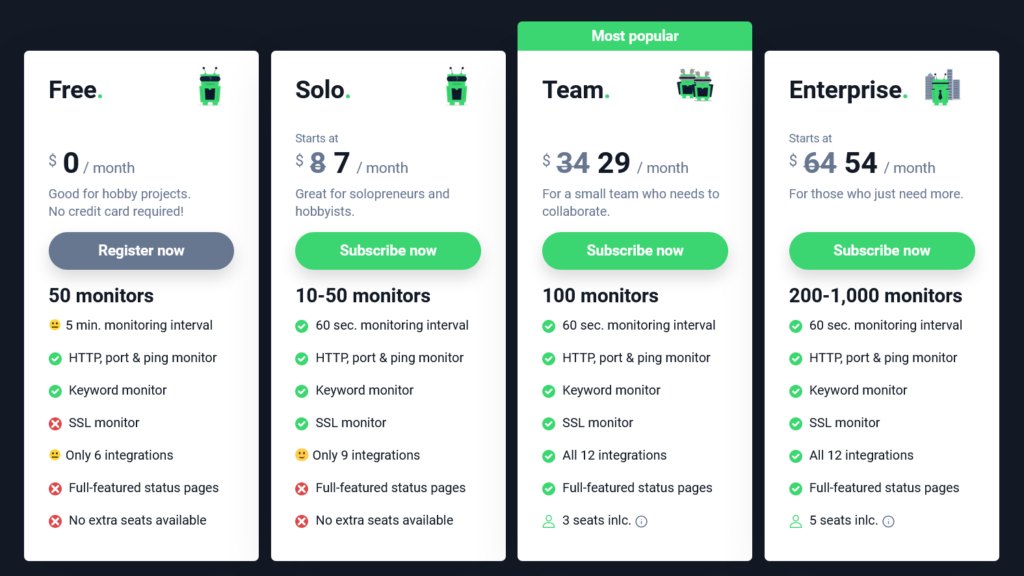
UptimeRobot Pricing Plans (2026)
UptimeRobot remains one of the most affordable options on the market.
| Plan | Price (Monthly) | Key Features |
| Free | $0 | 50 monitors, 5-min intervals, Email alerts. |
| Solo | ~$7 | 10 monitors, 1-min intervals, SSL/Domain monitoring. |
| Team | ~$28 | 100 monitors, 1-min intervals, Status pages, 20 SMS credits. |
| Enterprise | Custom | 500+ monitors, 30-sec intervals, Dedicated support. |
In-Depth Analysis: Why Your Website Needs Uptime Monitoring
The Hidden Cost of Downtime
If your site goes down for just one hour, you aren’t just losing visitors; you’re losing SEO authority. Google’s crawlers penalize websites that are frequently unreachable. By using UptimeRobot’s 1-minute monitoring intervals, you can fix issues before Google even notices.
Protecting Your Brand with Status Pages
Transparency builds trust. UptimeRobot allows you to create Status Pages (e.g., status.yourwebsite.com). When things go wrong, your customers can check this page for updates rather than flooding your support inbox.
Monitoring Your SSL & Domain
We have all been there—the website goes down because someone forgot to renew the SSL certificate or the domain registration. UptimeRobot treats these as “Monitors,” giving you a countdown so you never miss a renewal date again.
Final Verdict: Is UptimeRobot Right for You?
UptimeRobot is the ideal choice for:
- Developers and Small Businesses: The free tier is unbeatable.
- SaaS Founders: Status pages and incident management are vital for customer trust.
- IT Managers: Monitoring ports and heartbeats ensures the entire backend is stable.
If you need heavy-duty Full-Stack Observability (tracing code-level errors), you might look at Datadog or New Relic. However, for 95% of website owners, UptimeRobot provides exactly what you need: reliability, simplicity, and speed.
Expert Summary ⭐⭐⭐⭐⭐
With its massive 50-monitor free plan and lightning-fast 1-minute pro checks, UptimeRobot remains the undisputed king of website monitoring in 2026. It is an essential tool for anyone serious about their online presence.