
Canva Review 2026: Is It Still the Best Design Tool for Everyone?
1. Introduction: The Evolution of Canva
In the world of digital creativity, few tools have democratized design as much as Canva. Moving into 2026, Canva has evolved from a simple drag-and-drop editor into a full-scale AI-powered Visual Suite. Whether you are a small business owner, a social media influencer, or a corporate professional, Canva’s latest updates aim to replace complex software like Photoshop for 99% of daily tasks.
In this comprehensive Canva Review 2026, we will dive deep into its newest features, pricing, and whether the Pro version is still worth your investment.
2. Key Features of Canva in 2026
Canva’s 2026 update focuses heavily on Workflows and Generative AI. Here is what makes it stand out:
A. Magic Studio: The AI Powerhouse
The Magic Studio is now the heart of Canva. It includes:
- Magic Media (Image to Video): You can now turn a simple text prompt or a static image into a high-quality 5-second video clip.
- Magic SEO for Websites: A new feature that automatically optimizes your Canva-hosted websites for search engines.
- Magic Switch: The ability to transform a presentation into a blog post or an Instagram carousel with one click.
B. Professional Video Editing
Canva’s video editor has received a massive overhaul. It now supports smarter group editing and AI-powered scene transitions, making it a legitimate competitor for basic Premiere Pro tasks.
C. The Visual Suite
Canva is no longer just for posters. The Visual Suite includes:
- Canva Docs: Interactive documents with embedded designs.
- Canva Whiteboards: For real-time team brainstorming.
- Canva Websites: Easy-to-build landing pages with custom domains.
3. Canva Pro vs. Free: Which One is Right for You?
One of the most common questions is: Is Canva Pro worth it in 2026?
| Feature | Canva Free | Canva Pro (2026) |
|---|---|---|
| Templates | 250,000+ | 610,000+ Premium Templates |
| Stock Assets | Limited | 100+ Million Photos, Videos & Audio |
| Brand Kit | No | Yes (Unlimited Brand Kits) |
| AI Features | Limited Magic Morph | Full Magic Studio Access |
| Storage | 5 GB | 1 TB Cloud Storage |
| Background Remover | No | One-click Video & Image Remover |
Verdict: If you are a business or a frequent content creator, the Background Remover and Brand Kit alone make the Pro version a necessity.
4. User Experience and Interface (UI/UX)
Canva’s interface remains its greatest strength. Even with the addition of hundreds of new features in 2026, the drag-and-drop simplicity is preserved. The new Split Present Button and Automatic Page Breaks for documents show that Canva is listening to user feedback regarding productivity.
However, some users have reported that the mobile app can feel “heavy” due to the many features, occasionally leading to slower load times on older devices.
5. SEO and Marketing Capabilities
With the 2026 introduction of Magic SEO, Canva has moved into the marketing space. When you design a website or a landing page, Canva now suggests keywords and meta-descriptions to help your page rank on Google. This is a game-changer for entrepreneurs who don’t want to deal with WordPress or Wix.
6. Pros and Cons
Pros:
- Insane Ease of Use: No design degree required.
- All-in-One Platform: Design, schedule social media, and build websites.
- Massive Library: Millions of high-quality assets.
- Collaboration: Real-time team editing is seamless.
Cons:
- Offline Access: Still requires a stable internet connection.
- Export Limits: Professional printers still prefer CMYK exports from Adobe tools.
- App Glitches: Occasional crashes on the mobile version during complex edits.
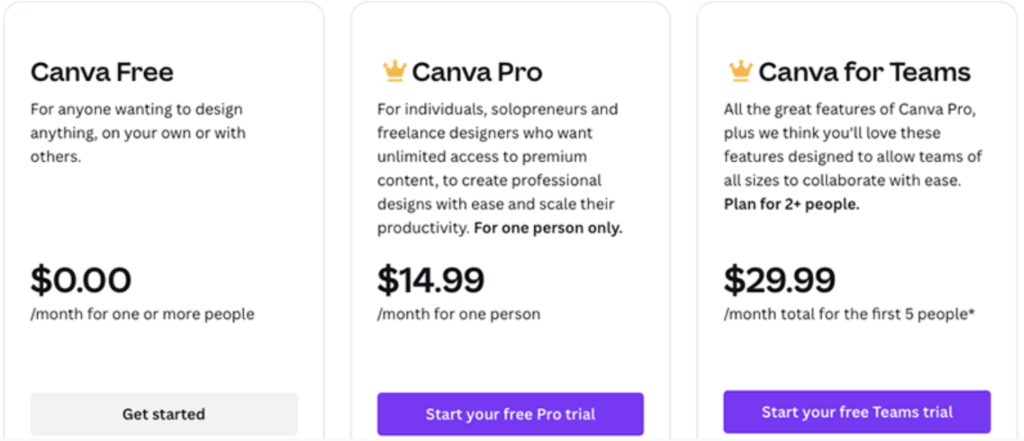
7. Pricing in 2026
Canva has simplified its pricing model:
- Canva Free: $0 (Great for students).
- Canva Pro: ~$15/month (Best for individuals).
- Canva for Teams: ~$30/month for the first 5 members (Best for agencies).
8. Final Verdict: Should You Use Canva?
In 2026, Canva is more than a design tool—it’s a productivity engine. While professional designers will still need the Adobe Creative Cloud for high-end vector work, Canva is the undisputed king for speed, efficiency, and social media marketing.
If you want to create stunning visuals in minutes rather than hours, Canva is a must-have.
Bluehost Review 2026: Is It Still the Best Hosting for WordPress?
[…] Bluehost and SEO: Can It Help You Rank? […]
SEMrush Review 2026: The Ultimate King of SEO or Overpriced? – Hanad review
[…] SEMrush vs. Ahrefs vs. Moz […]